See packets as they arrive
Inspect transmitted and received bytes, parsed values, and errors on a larger screen. The browser refreshes the log view every second.
Connect to BLE hardware on your iPhone. Follow live packets in a desktop browser, build and validate reusable profiles, then automate the next test — all with BLECI.
Waiting for a command…Response will appear hereKeep the phone beside your hardware and the protocol on your desktop. BLECI hosts a local workspace you can open from another device on the same Wi-Fi.
AA 01 19 00Write commandAA 81 19 00Notificationvalue = 25Ready for the next stepIllustrative packets · Your actual logs appear in the app’s local workspace.
Inspect transmitted and received bytes, parsed values, and errors on a larger screen. The browser refreshes the log view every second.
Open the browser Profile Editor, start from a template or exported running profile, and validate changes with BLECI. Download the JSON, then import it in the app.
Export logs as TXT or CSV for analysis and bug reports. Download the running profile and Markdown editing guide to keep the test setup alongside the results.
In BLECI’s Logs screen, enable Local Live Log Server.
Use the address shown in the app on a computer connected to the same Wi-Fi.
Watch logs, validate a profile, and import the downloaded JSON back into BLECI.
Local Live and profile import require an active BLECI membership. Keep BLECI open in the foreground. Use a trusted local network: the workspace uses HTTP and exposes logs and the running profile to devices on that network without sign-in.
Explore the app’s scanning, profile, and automation screens, as shown on the App Store.
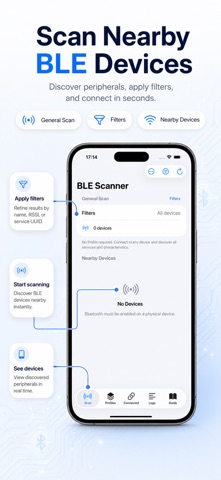
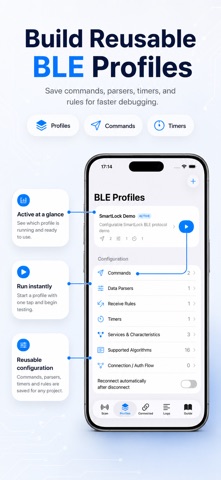
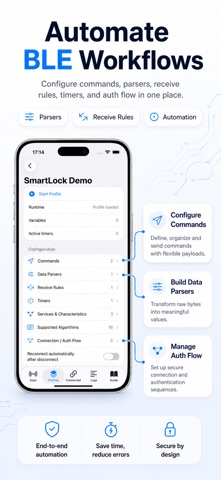
Hardware developer, firmware engineer, or curious maker — keep your device, data, and workflow in view.
Scan nearby BLE peripherals. Inspect advertised services, manufacturer data, and signal strength before connecting.
Discover GATT services and characteristics. Read values, write commands, and subscribe to notifications.
Build connection and authentication flows. Match incoming data, send automatic replies, and schedule commands.
Slice packets, decode numeric values, apply calculations, and save results as variables for your next command.
Organize device protocols in reusable profiles, with command templates, receive rules, and importable JSON.
Follow packets and parsed results in the app or a desktop browser with Local Live. Export TXT or CSV logs for analysis.
Local Live Log Server, profile import, and scheduled commands require membership in the app.
Start with a manual test. Build a reusable setup when you understand the exchange.
Tell us what you’re buildingFind a peripheral and inspect its GATT services and characteristics.
Test commands, capture notifications, and decode the response.
Put the exchange in a profile and configure rules, replies, and timers.
BLECI works with Bluetooth Low Energy peripherals that expose GATT services. Available actions depend on the device’s characteristic properties and protocol. It does not support Bluetooth Classic devices.
Yes. Profiles group scanning settings, services, commands, parsers, and automation rules. JSON import requires membership. Always adapt command payloads and UUIDs to your device before running a profile.
Yes. The iPhone maintains the BLE connection while Local Live serves a browser workspace on the same Wi-Fi. View live logs, export results, and edit profiles on your computer. Profile changes are validated, downloaded, and imported in BLECI; browser validation does not send Bluetooth commands or change the running profile.
The Local Live workspace is served by BLECI on your iPhone over the local network. Its logs and profile editor do not need a cloud upload. Keep the app in the foreground and use the Browser Address it displays. The public website’s sign-in and feedback are separate services.
This website introduces BLECI and collects community feedback. Bluetooth discovery, debugging, and automation happen in the iOS app. The workspace above is an interactive protocol example. Local Live is a separate workspace served by your iPhone when enabled in BLECI.
Anyone can read community comments. Sign in with ChatGPT to publish feedback or delete your own comment. Your public display name is shown; your email address is not published.
Found a rough edge? Missing a useful feature? Share what would make BLECI work better for you.
Have an idea, a question, or a bug to report? Join the conversation.
Sign in with ChatGPTYour email stays private. Your display name appears with your comment.